
Phase 4 of 6
Buy an artwork
Checkout, shipping fee, promo codes, and paying with QR Ph, e-wallets, online banking or BillEase installments.
In short
Tap Buy now, enter your contact details and Philippine address, and the shipping fee is calculated from the artwork's size and the distance. Pay with GCash, Maya, GrabPay, ShopeePay, QR Ph, BillEase installments, or online banking with BPI, UnionBank, BDO, Landbank or Metrobank; your payment is held until the artwork arrives.
3 minUpdated
Start checkout#
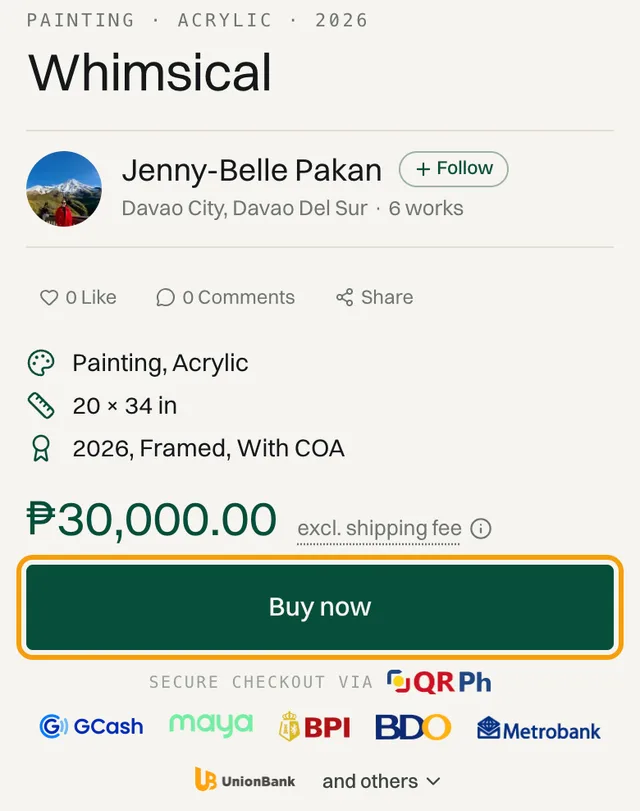
Tap Buy now on the artwork's page
The price shown doesn't include shipping yet. That's added once you enter your address.
Sign in, or continue as a guest
If you're signed in, your details are filled in for you. If not, you have three options:
Option How it works Your name and Email Fill in both and tap Continue to shipping. No password needed. Continue with Google Use your Google account. Sign in with email If you already have an account. 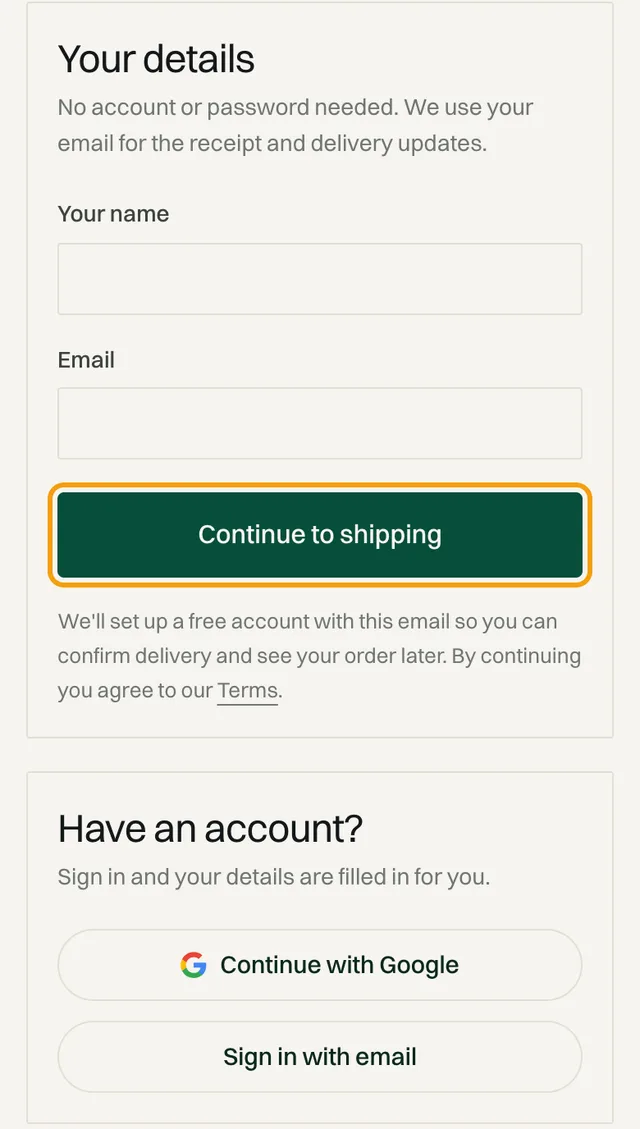
Checking out without signing in.
Enter contact and address#
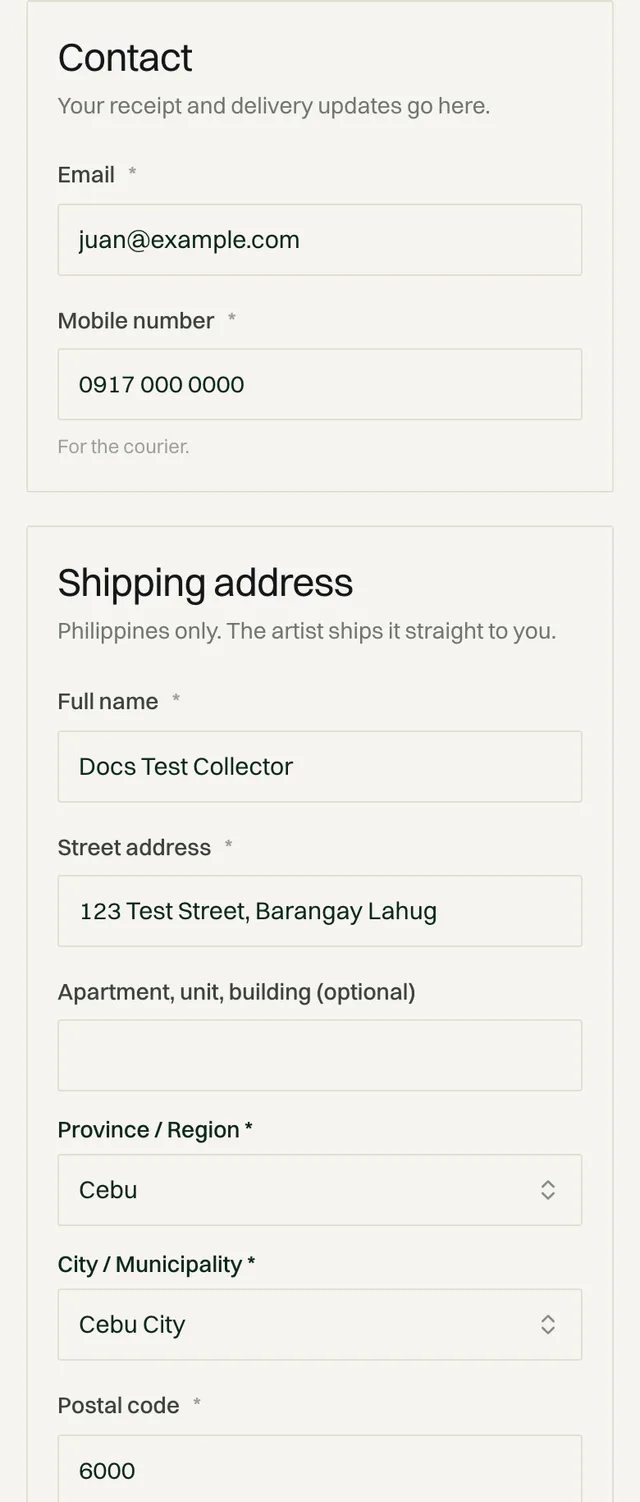
Orders ship within the Philippines only. The artist ships straight to you.
| Field | What to enter |
|---|---|
| EmailRequired | Your receipt and delivery updates go here. |
| Mobile numberRequired | For the courier, in the format 09XX XXX XXXX. |
| Full nameRequired | The person receiving the parcel. |
| Street addressRequired | House number, street, and barangay. |
| Apartment, unit, buildingOptional | Add it if it applies, plus a landmark if your street is hard to find. |
| Province and cityRequired | Choose your province first. Shipping is calculated as soon as you do. |
| Postal codeRequired | Your 4-digit ZIP code. |
How shipping is calculated#
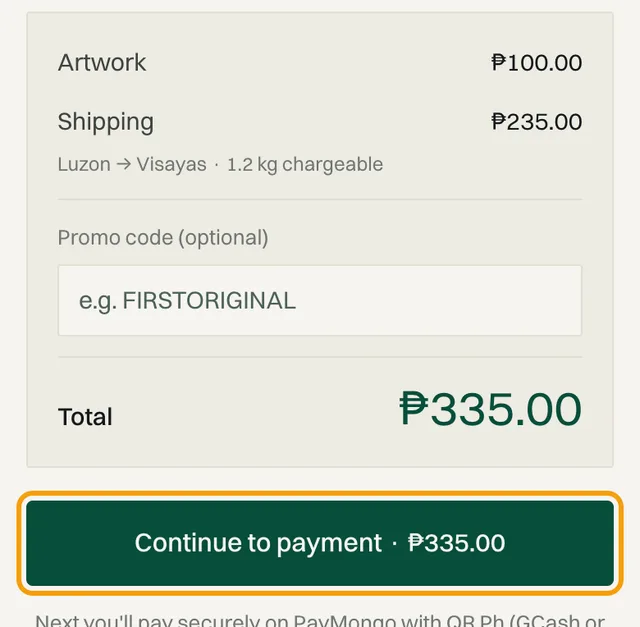
The fee is based on the artwork's size and weight, plus packaging, and the distance from the artist's city to yours. It appears as its own line in the order summary before you pay.
No surprise charges
Add a promo code#
Type your code into the promo code field in the order summary. A valid code is taken off your total on the payment screen.
Pay#
Tap Continue to payment
The button shows your total, including shipping.
Choose how to pay
Method How it works QR Ph Scan the code with your bank or e-wallet app. Works with most Philippine banks and e-wallets. GCash Pay from your GCash wallet. GrabPay Pay from your GrabPay wallet. Maya Pay from your Maya wallet. ShopeePay Pay from your ShopeePay wallet. Online banking Log in to your BPI, UnionBank, BDO, Landbank or Metrobank online banking and pay straight from your account. BillEase Buy now, pay later: split the price into monthly installments with BillEase. Debit and credit cards aren't supported yet.
Finish paying in your app
Your payment details are handled by our secure payment partner and never touch Obramaestra's servers.
Payment limits#
Every payment method has a minimum and a maximum per transaction. Your bank or e-wallet can also set a lower limit of its own, per payment or per day. If a payment fails, check your limit with your bank or e-wallet first, or try another method.
| Method | Limit per payment |
|---|---|
| QR Ph | ₱1.00 minimum, maximum depends on your bank or e-walletAny bank or e-wallet app that scans QR Ph |
| E-wallets | ₱1.00 minimum, ₱100,000 maximumGCash, Maya, GrabPay, ShopeePay |
| Digital wallets | ₱1.00 minimum, maximum depends on your bank or e-walletNot offered at checkout yet |
| Debit and credit cards | ₱1.00 minimum, ₱9,999,999.00 maximumNot offered at checkout yet |
| BPI online banking | ₱1.00 minimum, ₱50,000 maximumBPI lets you change your own limit |
| UnionBank online banking | ₱1.00 minimum, ₱100,000 maximum |
| BDO online banking | ₱100.00 minimum, ₱50,000 maximum |
| Landbank online banking | ₱1.00 minimum, ₱50,000 maximum |
| Metrobank online banking | ₱1.00 minimum, ₱50,000 maximum |
| RCBC online banking | ₱1.00 minimum, maximum depends on your bank or e-walletNot offered at checkout yet |
| Buy now, pay later (BillEase) | ₱100.00 minimum, ₱150,000.00 maximumPay in monthly installments |
For a large purchase, BillEase (up to ₱150,000), UnionBank online banking (up to ₱100,000) or QR Ph from your bank app usually allow the most. GCash, Maya and other wallets often have lower monthly limits unless your account is fully verified.
After you pay#
You'll see Payment received with your order number and total. If it says Confirming your payment…, wait a few seconds. It updates on its own.
Right after that:
You get a confirmation email
The artist is told to prepare your artwork
The artwork is marked sold, so no one else can buy it
Guests: set a password
Under Keep track of your order, choose a password so you can sign in and follow your order.
If you don't finish#
If you go to payment but don't complete it, the artwork waits under Unfinished checkouts in DashboardOrders for 15 days. Tap Continue checkout to pick up where you left off.
Nothing is held for you
How your payment is protected#
Your money doesn't go to the artist when you pay. Obramaestra holds it until the artwork reaches you. The how it works page shows the full timeline.
| When | What happens |
|---|---|
| When you pay | Obramaestra holds the money. |
| When it arrives | You confirm delivery, and the money goes to the artist. |
| If something's wrong | Request a refund before the payment is released, and our team reviews it. |
| If you forget | The payment is released automatically 14 days after the artist marks it shipped. |
Full details are in Phase 6 and the Return & refund policy.
Common questions#
The button says “Shipping unavailable”. What do I do?
Check that your province and city are selected, then try again. If it still won't calculate, message the artist or email support@obramaestra.art.
I paid, but the page still says “Confirming your payment”.
Wait a minute and refresh. Payment confirmations sometimes take a moment. Your order will appear in Dashboard › Orders once it's confirmed. If it doesn't after 15 minutes, email support with your payment reference.
My payment failed. What should I check?
First check your transaction limit with your bank or e-wallet. Each method has a maximum per payment (see Payment limits), and your own account may allow less. You weren't charged for a failed payment, so you can try again with another method.
Can I negotiate the price?
You can message the artist to ask. The price at checkout is always the one on the listing.
Related reading
- Collecting · 11 min readWhere to Buy Authentic Filipino Art Online: A Guide for CollectorsFive places to buy Filipino art online, from Facebook sellers to online galleries, art fairs, auctions, and Obramaestra. Plus a five-point check that tells you whether a painting is the real thing.
- Collecting · 10 min readHow to Verify the Authenticity of Artworks in the Philippines: A Collector's GuideA six-step check to verify authentic paintings in the Philippines before you pay: provenance, certificates, the front and back of the canvas, and what to ask a seller for, whether the work is an Amorsolo or a canvas by a living Filipino artist.
- Collecting · 8 min readTop Artsy Alternatives for Buying Original Philippine ArtLooking for Artsy alternatives for Philippine art? Compare Obramaestra, Saatchi Art, Vintana, and Cartellino on price, protection, and delivery.
Stuck on a step? Email support@obramaestra.art with a screenshot and the step you're on, or use the contact page.