
Phase 5 of 6
Track your order
Order statuses, tracking numbers, and messaging the artist.
In short
Open Dashboard, then Orders, to see your order move from Paid to Shipped, Delivered and Completed. Once the artist ships, the order shows the courier, tracking number and the date payment auto-releases.
Depends on distanceUpdated
Find your order#
Go to DashboardOrders
Find the order in the list
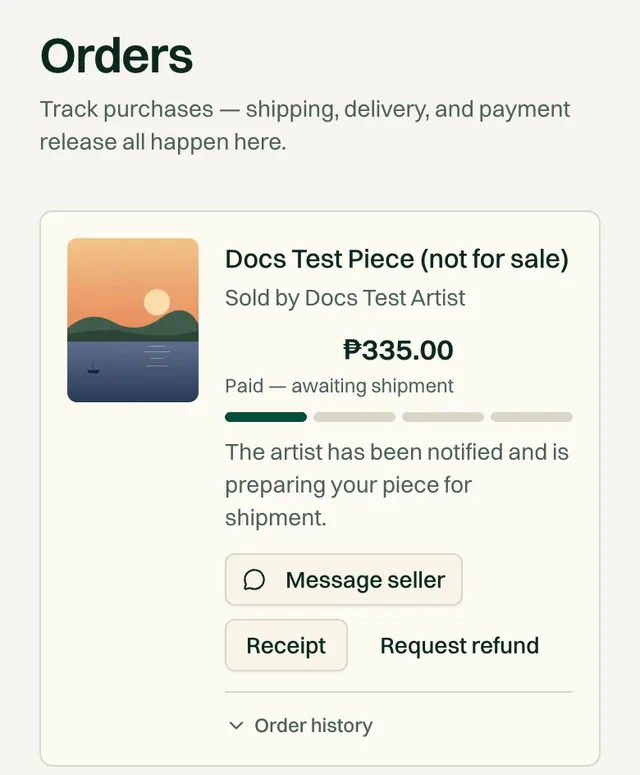
Each order shows the artwork, the artist, the total you paid, its status, a progress bar, and what happens next. (If you also sell, your orders are under the Purchases tab.)
We also email you at every change, so you don't need to keep checking.
What each status means#
Status 1
Paid — awaiting shipment
The artist has been notified and is preparing your piece.
Status 2
Shipped
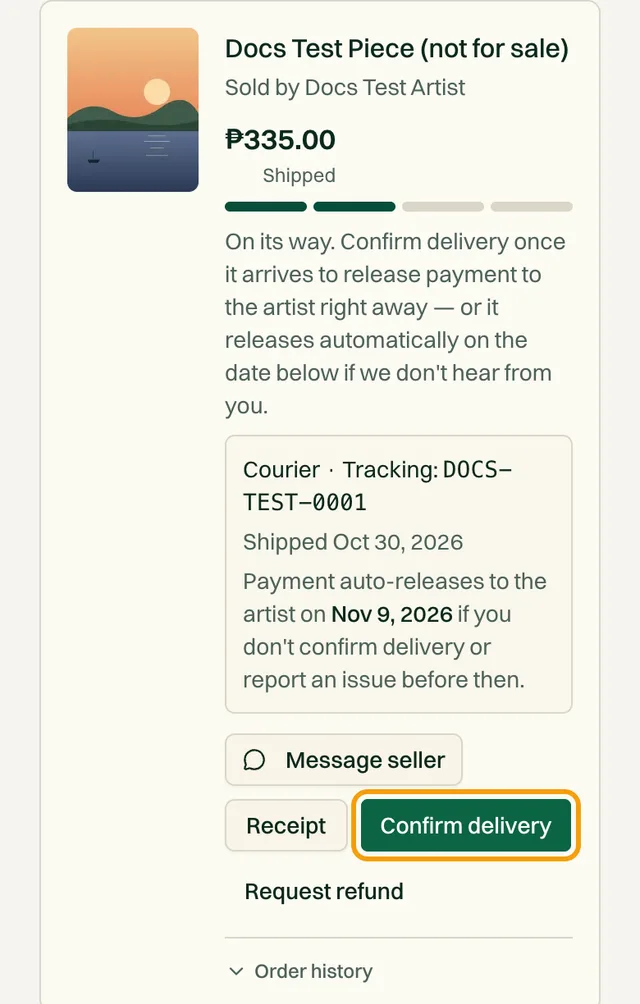
It's on its way. The courier and tracking number appear on your order.
Status 3
Delivered
You confirmed it arrived. Payment is being released to the artist.
Status 4
Completed
Payment has been released to the artist. The sale is final.
| Status | What it means |
|---|---|
| Cancelled | The order didn't go through, for example if the piece sold to someone else at the same moment. You aren't charged. |
| Refunded | Your refund was approved and sent back to your original payment method. |
Follow the tracking number#
When the artist ships, you get an email titled Shipped, and your order shows the courier and tracking number, such as “J&T Express · Tracking: 1234567890”.
Copy the tracking number from your order
Look it up on the courier's website or app
For J&T Express, tap Track on J&T right on your order. For LBC Express, Ninja Van, JRS Express, and 2GO Express, use their own tracking page.
Your auto-release date
How long delivery takes#
Transit time depends on the distance between the artist's city and yours. Nearby deliveries can take just a few days, while longer routes take more. Luzon to Mindanao, for example, regularly runs 7 to 10 days by courier.
The 14-day window before payment auto-releases is set with these longer routes in mind, so you have time to receive and inspect the piece.
Message the artist#
Tap Message seller on the order to ask about timing, give a delivery landmark, or share a better time to receive the parcel.
Get your receipt#
Tap Receipt on the order. It shows the artwork price, shipping, total paid, and the address it was shipped to. Tap Print / Save as PDF to print it or save it as a PDF from your browser.
Common questions#
It's been several days and my order still isn't shipped.
Message the artist first. If you don't hear back, email support@obramaestra.art with your order details. Your payment stays protected the whole time.
The tracking number doesn't work.
New tracking numbers can take a day to appear on the courier's site. If it still doesn't work after that, message the artist to double-check it.
Can I change my delivery address after paying?
Message the artist right away, before they ship. Once the parcel is with the courier, it usually can't be changed.
Related reading
Stuck on a step? Email support@obramaestra.art with a screenshot and the step you're on, or use the contact page.