

Phase 6 of 6
Get paid
When payment releases, what you keep, and how payouts reach you.
In short
You're paid 85% of the price plus the full shipping fee once the buyer confirms delivery, or 14 days after you mark the order shipped. Every Wednesday your available balance goes to your GCash, Maya or bank account if it's at least ₱1,000, or you can cash out yourself.
Up to 14 days after shippingUpdated
When payment is released#
The buyer's payment is held by Obramaestra until the artwork arrives. It's released to you when the first of these two things happens:
| Whichever comes first | What happens |
|---|---|
| The buyer confirms delivery | They tap Confirm delivery on their order. Payment releases right away. |
| 14 days pass | Counted from the day you marked the order shipped. Payment releases automatically, even if the buyer never confirms. |
When it releases, the order shows Completed and you get an email titled Payment released.
A refund request pauses this
What you keep#
Obramaestra's commission is 15% of the artwork price, on every plan. You keep the other 85%, plus the entire shipping fee.
| Artwork price | ₱10,000 |
|---|---|
| Commission (15% of the price) | − ₱1,500 |
| Shipping fee the buyer paid | + ₱450 |
| Added to your balance | ₱8,950 |
You pay the courier yourself when you drop off the parcel, so the shipping fee in your payout reimburses that cost.
Your Earnings page#
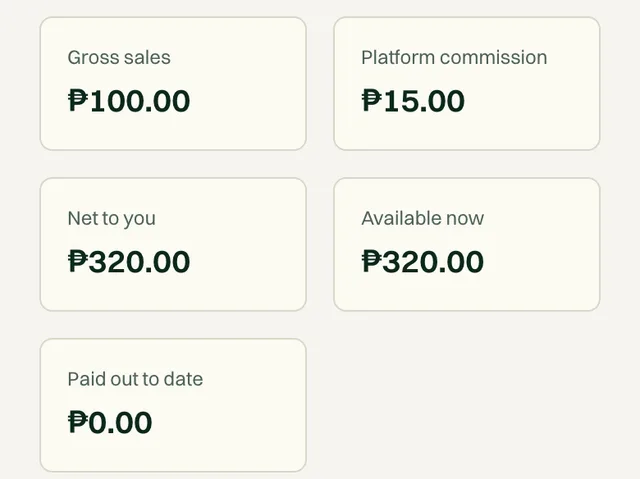
DashboardEarnings shows five numbers:
| Number | What it shows |
|---|---|
| Gross sales | The total of all your sales. |
| Platform commission | The 15% Obramaestra kept. |
| Net to you | What you've earned: sale prices minus commission, plus the shipping fees buyers paid. |
| Available now | Released money that hasn't been paid out yet. This is what gets sent to you. |
| Paid out to date | Everything already sent to your bank or e-wallet. |
Below them you'll find your payout settings, your Payout history, and your recent orders.
Add your payout details#
You chose a payout method and account name during setup. Before your first payout, you also need to add the account number. If anything is missing, the Earnings page shows Add your payout details to get paid.
Tap Complete it in Account, or go to DashboardAccount
Fill in the Payouts tab
Field What to enter Bank or e-walletRequired Pick your bank, GCash or Maya from the list. Account nameRequired Exactly as it appears on that account. A mismatch is the most common reason a transfer bounces. Account numberRequired Your bank account number, or the mobile number registered to GCash or Maya. 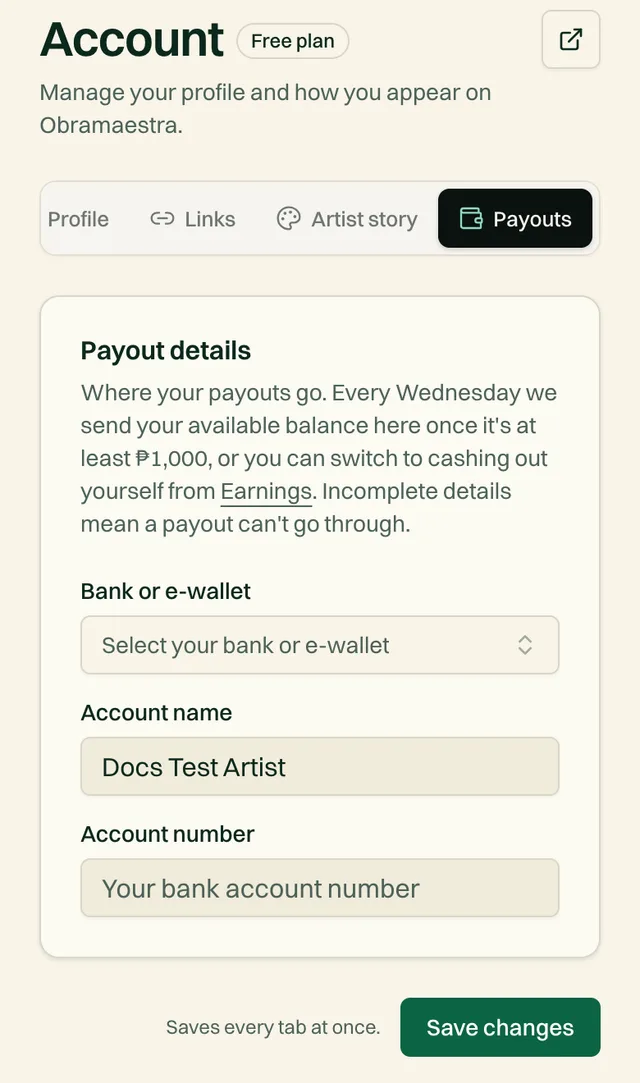
Tap Save changes
Automatic weekly payouts#
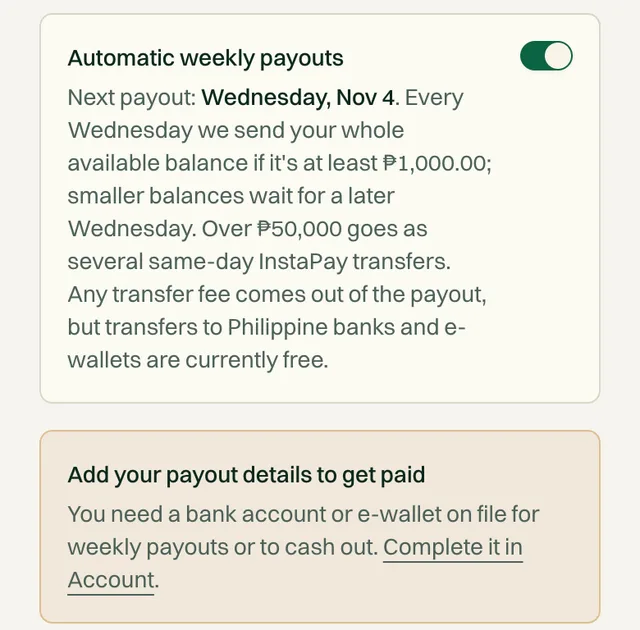
This is on by default. Every Wednesday, we send your whole Available now balance to your account through InstaPay, as long as it's at least ₱1,000.
How it works
- Balances under ₱1,000 wait for a later Wednesday.
- The money usually lands the same day.
- Balances over ₱50,000 go out as several transfers on the same day, because InstaPay sends at most ₱50,000 at a time.
- Any transfer fee comes out of the payout, but transfers to Philippine banks and e-wallets are currently free.
- You get an email each time a payout is sent.
The switch is called Automatic weekly payouts on your Earnings page, with the date of your next payout below it.
Cash out yourself#
Prefer to choose when you're paid? Switch to manual payouts.
Turn off Automatic weekly payouts on DashboardEarnings
Tap Cash out
Enter the amount
Any amount up to your available balance, with a maximum of ₱50,000 per transfer. For more, cash out again.
Confirm
You'll see “Payout requested — it's on its way to your account.” It appears in your Payout history.
Switch back any time
Full timeline, start to finish#
A typical sale
| When | What happens |
|---|---|
| Day 0 | A collector pays. You get the “You sold” email. |
| Day 1–3 | You pack, drop off at the courier, and tap Mark shipped. |
| Day 3–13 | The parcel is in transit. Luzon to Mindanao routes often take 7 to 10 days. |
| On delivery | The buyer confirms. The money moves to Available now. |
| Next Wednesday | Your balance is sent to your bank or e-wallet (if it's at least ₱1,000). |
If the buyer doesn't confirm, the money moves to Available now 14 days after you marked it shipped, and goes out the following Wednesday.
Common questions#
My buyer received the piece but hasn't confirmed. Can I speed it up?
You can message them and politely ask them to tap Confirm delivery on their order. Otherwise, payment releases automatically 14 days after you marked it shipped.
It's Wednesday and I wasn't paid. Why?
Usually one of three reasons: your available balance is under ₱1,000, your payout details are incomplete, or the order hasn't completed yet. If none of these apply, email support@obramaestra.art.
Are there fees on payouts?
Any transfer fee comes out of the payout, but transfers to Philippine banks and e-wallets are currently free.
Related reading
Stuck on a step? Email support@obramaestra.art with a screenshot and the step you're on, or use the contact page.