


Phase 5 of 6
Make a sale and ship it
What happens when a piece sells, how to pack it, and marking it shipped.
In short
When a piece sells, you get an email and the buyer's address is on the order's receipt. Pack it to the packaging guidelines, drop it at a courier such as J&T Express or LBC, then enter the carrier and tracking number and tap Mark shipped.
1–3 daysUpdated
When a piece sells#
The moment a collector pays, three things happen automatically:
- You get an email titled You sold [artwork title] and a notification, showing what you'll receive once the order completes.
- The listing is marked Sold, so no one else can buy it.
- The buyer's payment is held safely by Obramaestra. It isn't released to you until the piece arrives.
Ship fast
The order's journey#
Status 1
Paid — awaiting shipment
Your move
The buyer has paid. Pack the piece and ship it.
Status 2
Shipped
Courier's move
You entered the carrier and tracking number. The buyer is notified.
Status 3
Delivered
Buyer's move
The buyer confirmed it arrived in good condition.
Status 4
Completed
Done
Payment is released to your available balance.
If the buyer never confirms, the order completes on its own 14 days after you mark it shipped. Details are in Phase 6.
Find the buyer's address#
Go to DashboardOrders and open the Sales tab
The new order shows Paid — awaiting shipment.
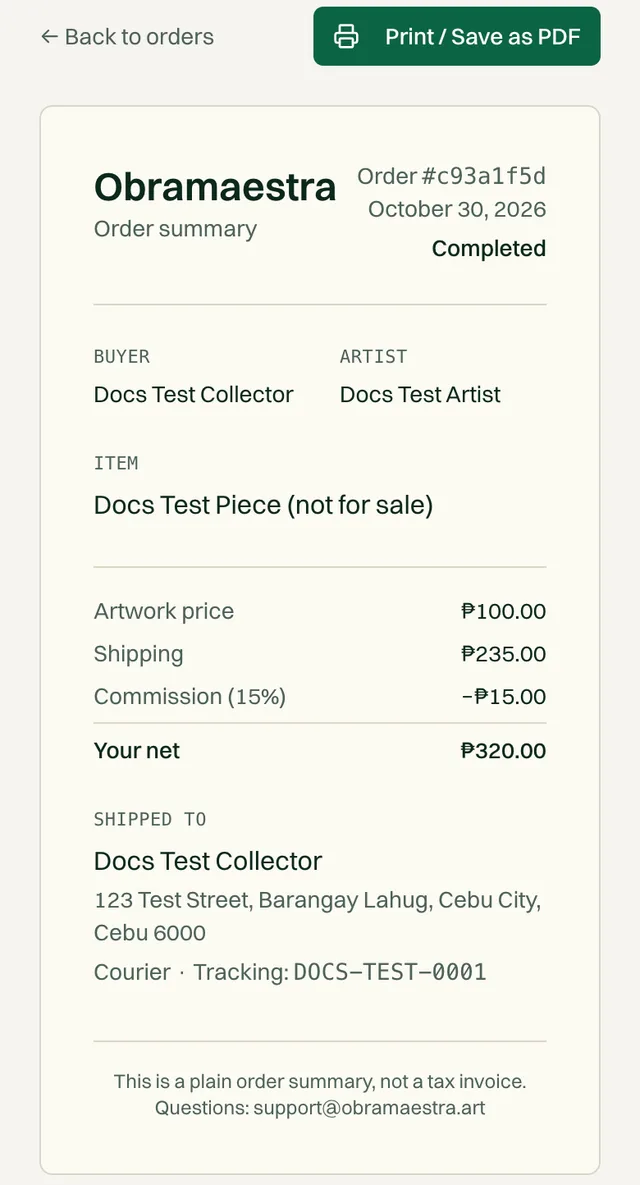
Tap Receipt on the order
Under Shipped to you'll find the buyer's full name and address. The receipt also shows the shipping fee and Your net for this sale. Tap Print / Save as PDF to keep a copy.
Message the buyer if anything's unclear
Tap Message buyer on the order to confirm a landmark, a delivery time, or a mobile number for the courier.
Pack the artwork#
Damage in transit is grounds for a refund, and the refund comes out of the sale. Good packing is the biggest thing you control. The full guide, by type of work, is in the Packaging guidelines.
Materials
- Glassine or acid-free tissue for anything touching the surface
- Plastic sheeting to seal out moisture
- Bubble wrap (at least two layers) and cardboard corner protectors
- Foam board or two-ply cardboard to keep flat work rigid
- A sturdy box with 2–3 inches of space on every side, plus tape and FRAGILE labels
Quick version for a framed or unframed flat work
Make sure the paint is fully dry
Paint can feel dry on top while still curing underneath. Packing too soon is a common cause of damage.
Wrap the surface in glassine or acid-free tissue, and add corner protectors
Sandwich it between two sheets of foam board, taped at the edges
For glass or acrylic, tape a large X across it first so any break stays in one piece.
Seal it in plastic, then wrap it in bubble wrap
Box it with padding on every side, so nothing moves when you shake it
Tape the box in an H pattern and mark it FRAGILE
Longer than 59 inches, or very fragile?
Drop it off at the courier#
Choose a courier
Use any of these: J&T Express, JRS Express, LBC Express, Ninja Van, or 2GO Express.
Take photos before you hand it over
Photograph the packed box with the label on, its dimensions against a tape measure, and the materials you used. Keep them until the order completes. If the buyer reports damage, these photos protect you.
Pay the courier and keep the receipt
The buyer already paid the shipping fee at checkout, and it's added to your payout in full. If the courier charges more than that, the difference is yours to cover. This is why accurate sizes and weights matter.
Note the tracking number
Mark it shipped#
This is the step that starts the clock on your payment. Do it the same day you drop off the parcel.
Open DashboardOrdersSales
Fill in the shipping details on the order
Field What to enter CarrierRequired J&T Express (the default), LBC Express, Ninja Van, JRS Express, 2GO Express, or Other. Tracking numberRequired Exactly as printed on the courier's receipt. 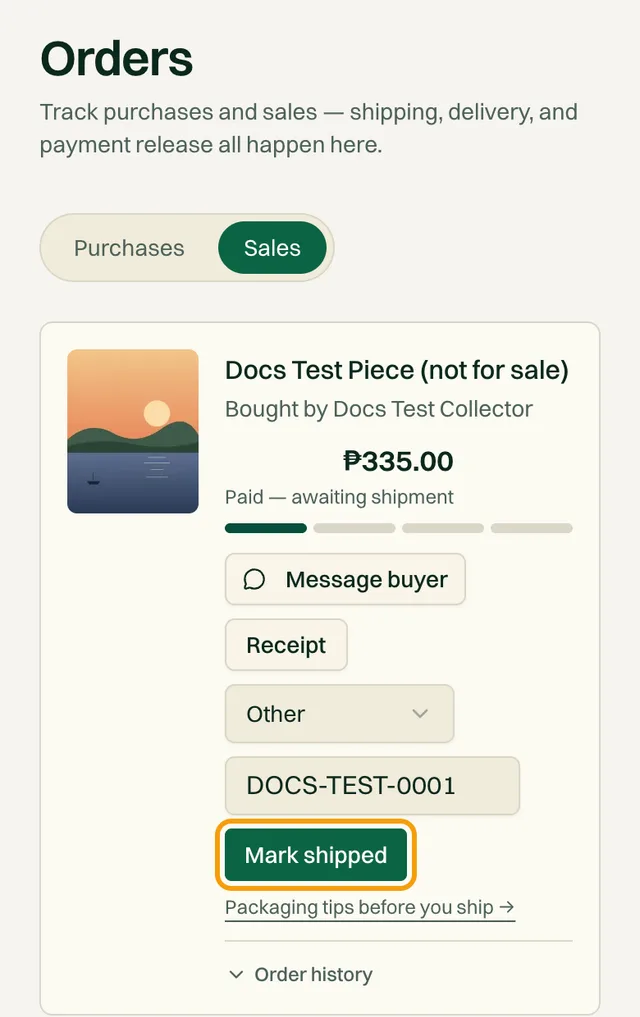
The Packaging tips before you ship link under the button opens the packaging guidelines. Tap Mark shipped
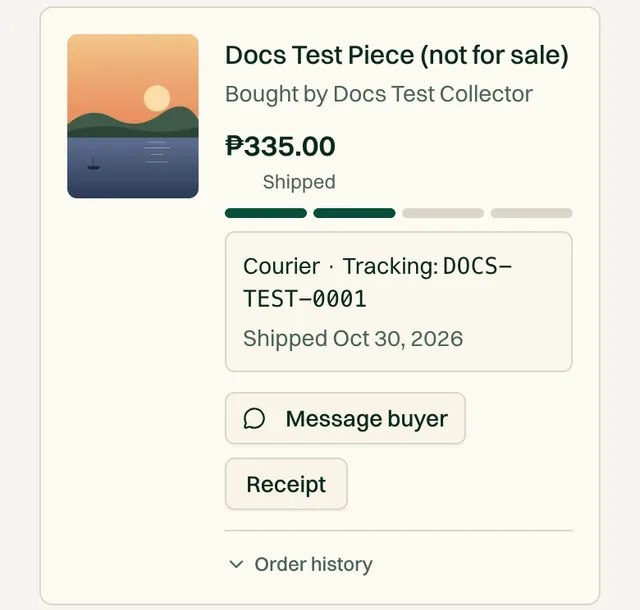
The status changes to Shipped. The buyer gets an email with the tracking number and the date their payment will release to you automatically.
After you ship#
- Reply quickly if the buyer messages you about the delivery.
- When the buyer confirms delivery, you get an email and the order moves to Completed.
- After it completes, you can rate the buyer from the order.
If the buyer asks for a refund
Common questions#
I can't find the buyer's phone number. What should I put for the courier?
Message the buyer from the order and ask for the best mobile number for delivery. They gave one at checkout for the courier.
The courier charged more than the shipping fee. Can I ask the buyer for the difference?
No. The fee shown at checkout is final for the buyer. Check that the width, height, depth, and weight on your listings are accurate to avoid this next time.
I typed the wrong tracking number. How do I fix it?
Email support@obramaestra.art with the order and the correct number, and message the buyer so they know.
Related reading
Stuck on a step? Email support@obramaestra.art with a screenshot and the step you're on, or use the contact page.