Phase 2 of 6
Set up your artist profile
Name, location, bio, social links, and where you get paid.
In short
Artist setup has five short steps: your display name and city, an artist statement and bio, social links, your payout method (bank, GCash or Maya), and a final review. Only the name, location, payout account name and one quick question are required.
3 minUpdated
The five steps#
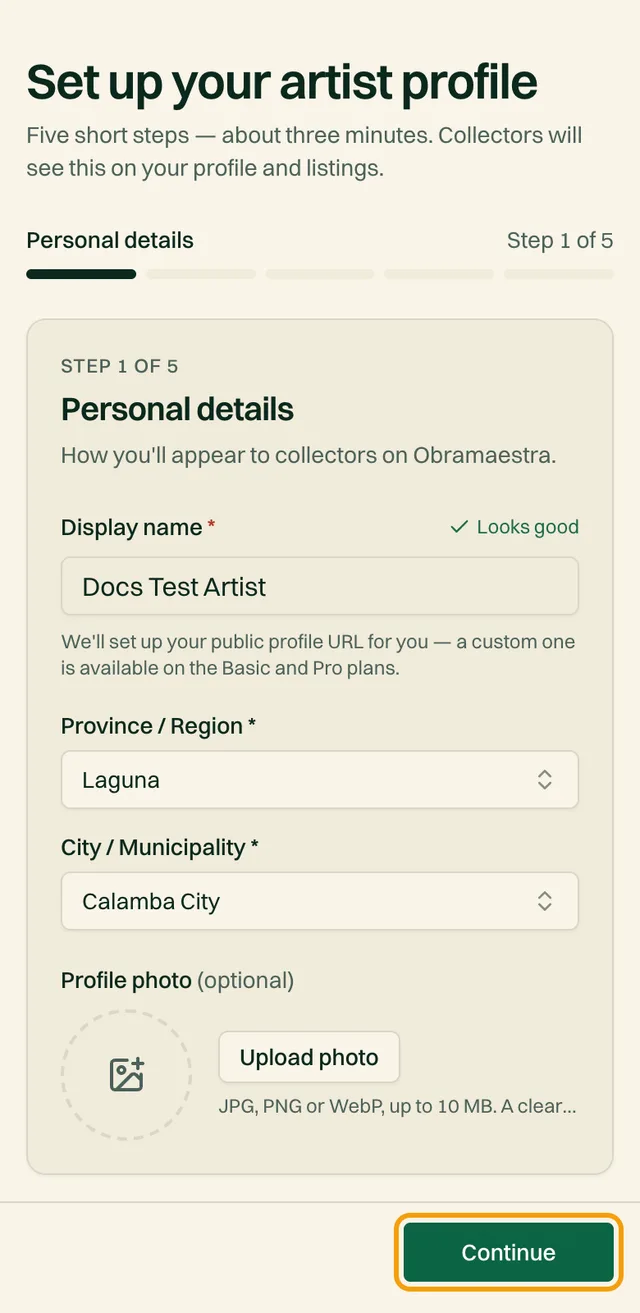
Right after you choose the Artist role, you'll see Set up your artist profile. It has five short steps and takes about three minutes. Collectors see this information on your profile and your listings.
Move between steps with Continue and Back. Steps 2 and 3 are optional: tap Skip for now and come back later. Your progress isn't lost if your connection drops. Just press Finish setup again.
1. Personal details#
How you'll appear to collectors.
| Field | What to enter |
|---|---|
| Display nameRequired | Your real name or the name you sign your work with. We create your public profile link from it. |
| Province and cityRequired | Choose your province or region first, then your city or municipality. Buyers see this as where the work ships from, and it's used to calculate shipping. |
| Profile photoOptional | A clear photo of you or your studio. JPG, PNG or WebP, up to 10 MB. You can add one later. |
Use your city of dispatch
2. Your art (optional)#
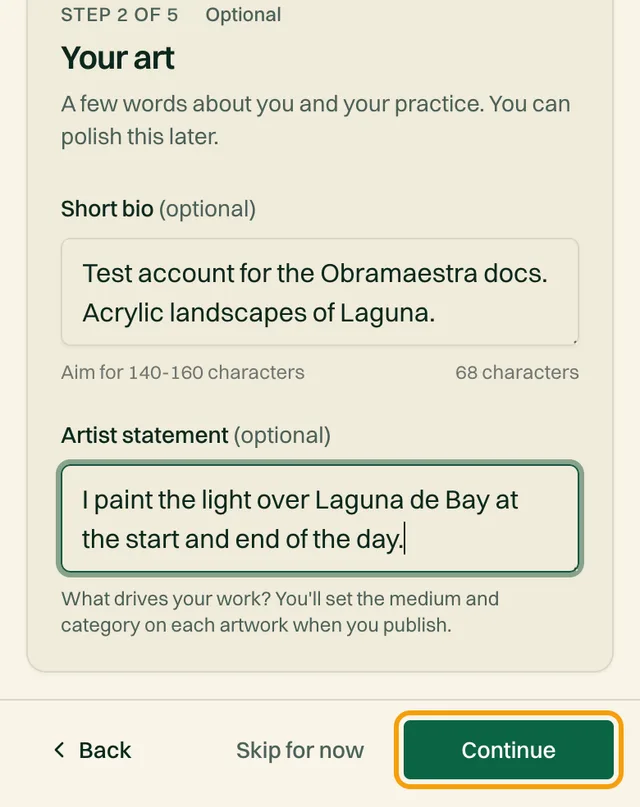
A few words about you and your practice. You can polish this later. For what to write, see how to write an artist profile collectors trust.
| Field | What to enter |
|---|---|
| Artist statementOptional | One or two sentences on what you make and why, up to 160 characters (120 to 160 is ideal). A counter below the box helps. It appears under your name, on artist cards, and in Google search results. |
| BioOptional | Your story: how you started, the mediums you use, your favorite subjects, who inspires you. Aim for 600 to 1,500 characters. You'll set the medium and category on each artwork, not here. |
4. Payout#
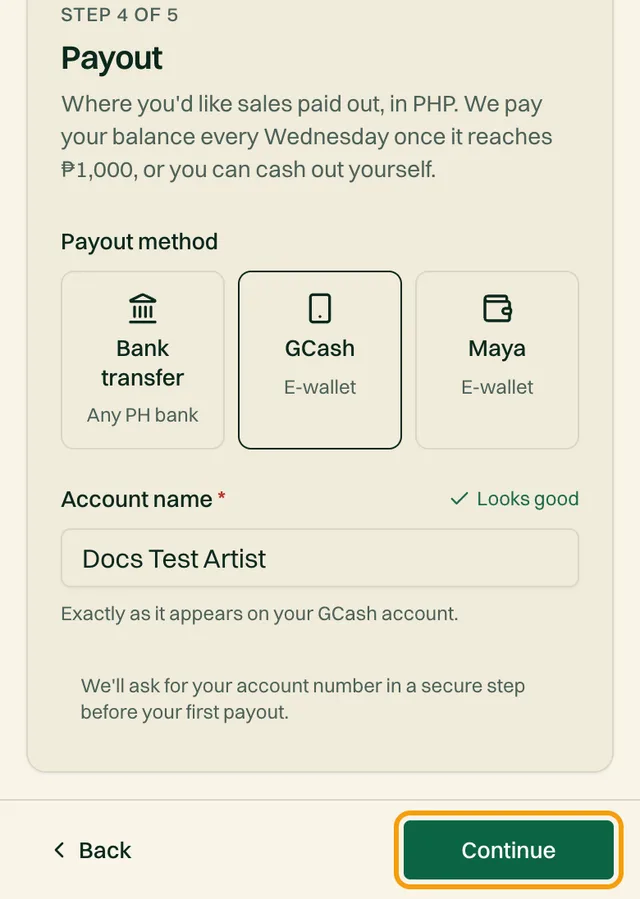
Where your sales money goes, in Philippine pesos.
Choose a payout method
Bank transfer (any Philippine bank), GCash, or Maya.
Enter your account details
Field What to enter Account nameRequired Exactly as it appears on your bank account, GCash, or Maya. A mismatch can make a transfer fail. BankOptional Bank transfer only. For example BDO, BPI, or Metrobank. You won't enter your account number here. We ask for it in a separate secure step before your first payout, under DashboardAccount.
How payouts work, in one line
5. Almost done#
Tell us where you heard about Obramaestra
Pick an option from the list. It takes one tap.
Check your details
You'll see a summary of your display name, location, photo, bio, social links, and payout method. Tap Edit on any line to jump back and fix it.
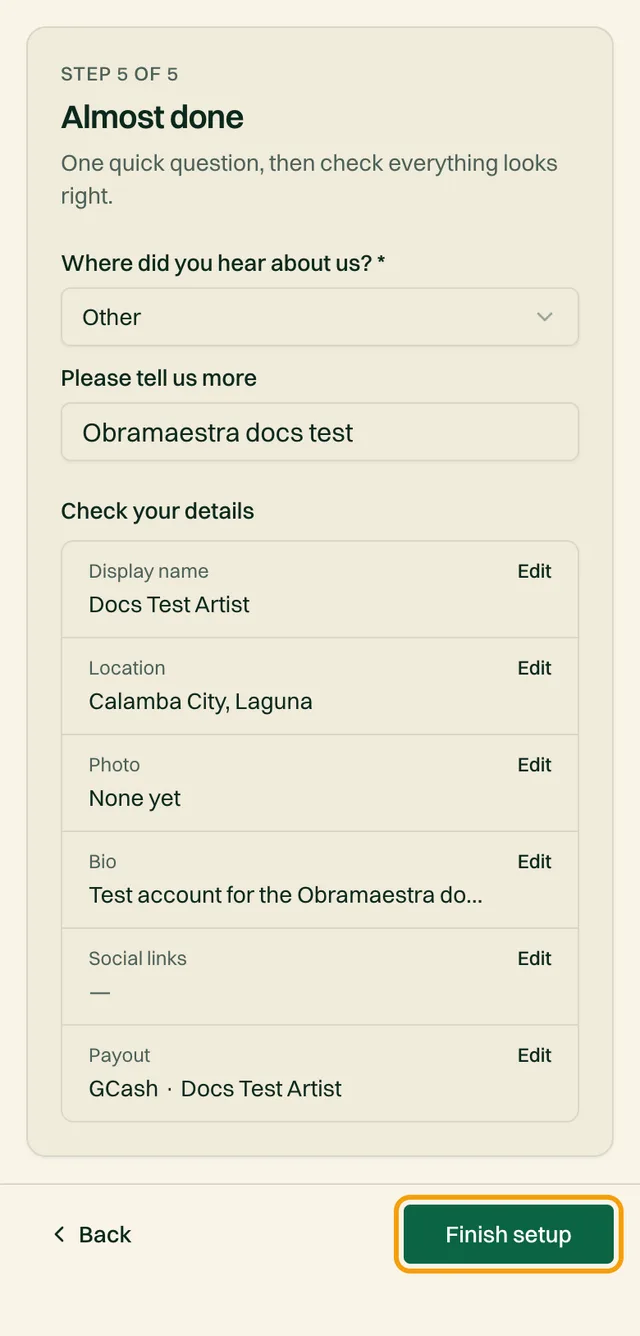
Tap Finish setup
You'll see You're all set! and land on your dashboard.
Before you move on
- Your display name is the name collectors will know you by
- Your city is where you'll ship from
- Your payout account name matches your bank or e-wallet exactly
Editing it later#
Change anything from DashboardAccount. It has four tabs: Profile, Links, Artist story and Payouts. Tap Save changes when you're done; it saves every tab at once.
To share your profile, open Your profile link and copy it. A custom link (like obramaestra.art/artist/yourname) comes with the Basic and Pro plans.
Common questions#
My photo won't upload. What now?
Remove it, finish setup without one, and add it later from Account. If it still fails, try a smaller JPG or PNG.
Can I use an artist name instead of my real name?
Yes, for your display name. Your payout account name must still match your bank or e-wallet, and if you apply for the verified check, you'll enter your legal name as it appears on your ID.
Related reading
Stuck on a step? Email support@obramaestra.art with a screenshot and the step you're on, or use the contact page.
3. Social links (optional)#
Free promotion. Collectors can follow you elsewhere too.