
Phase 1 of 6
Create your account
Sign up, verify your email, and choose the Artist role.
In short
Sign up at obramaestra.art/auth with Google or your email, click the verification link we email you, then sign in and choose Artist on the Welcome screen. It's free, and Obramaestra only earns a 15% commission when a piece sells.
2 minUpdated
Before you start#
Creating an account is free and takes about two minutes. Have these ready:
You'll need
- An email address you can open right now (the verification link goes there)
- A password of at least 8 characters, or a Google account to sign in with
- Your phone or computer — everything works in a mobile browser
Only original work
Sign up#
Open the sign-up page
Go to obramaestra.art/auth, or tap Sign in at the top of any page and then Create an account.
Pick how you'll sign up
You have two options:
Option How it works Sign up with Google One tap. Your name and email come from your Google account, and there's no email to verify. Email and password Fill in the form below. Use this if you don't want to link a Google account. Fill in the form
Field What to enter Full nameRequired Your real name. You can choose a different public display name in the next phase. EmailRequired Where we send your verification link, sale alerts, and payout receipts. PasswordRequired At least 8 characters. Symbols aren't required. Tick the box to agree to the Terms, then tap Create my account.
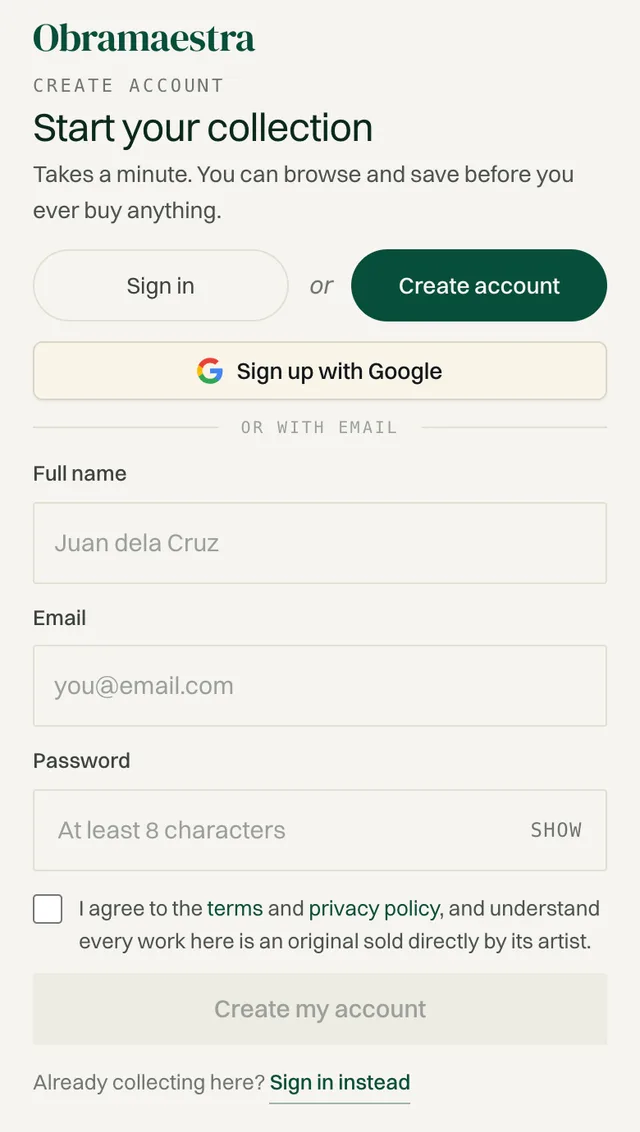
The sign-up page on a phone.
Verify your email#
After you sign up with email, you'll see Check your email. Your account isn't active until you click the link we send.
Open the email from Obramaestra
It arrives within a minute or two. If you don't see it, check your Spam or Promotions folder.
Click the verification link
You'll land back on the sign-in page with the message Email verified successfully.
Sign in
Enter your email (or username) and password, then tap Sign in.
Choose the Artist role#
The first time you sign in, you'll see Welcome to Obramaestra with two choices.
Select Artist
“Publish, price, and sell your original artworks.” New accounts start on Collector, so make sure you switch it.
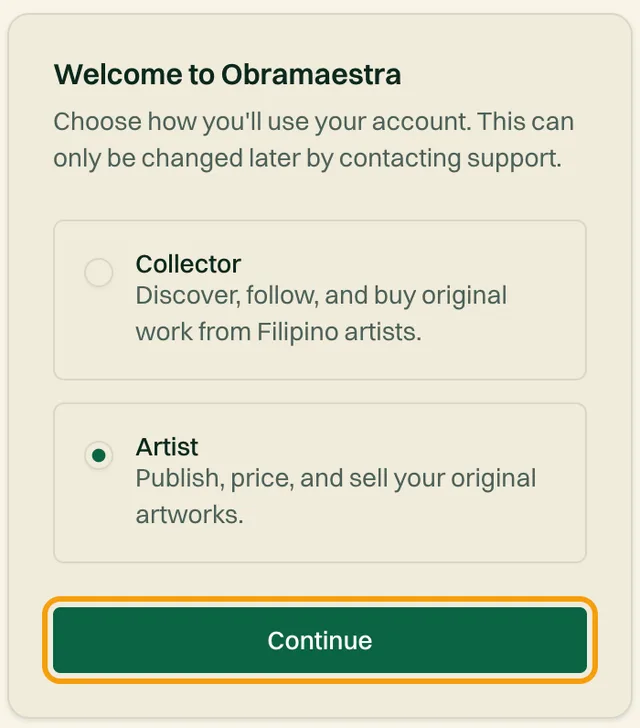
Tap Continue
This opens the artist profile setup, which is the next phase.
Pick carefully
Common questions#
The verification email never arrived. What do I do?
Check Spam and Promotions first. If it still isn't there after 10 minutes, email support@obramaestra.art from the address you signed up with.
I forgot my password. How do I reset it?
Go to Forgot password, enter your email, and follow the link we send to set a new one.
Does it cost anything to join?
No. The Free plan lets you list up to 10 artworks. Obramaestra earns a 15% commission only when a piece sells. Paid plans are optional and covered in Phase 4.
Related reading
Stuck on a step? Email support@obramaestra.art with a screenshot and the step you're on, or use the contact page.